
What does Bivela do?
The app is organised into six main areas: daily logging, patterns, therapy work, assessment, safety and the companion. Here you see each one with a real look at its screen.
- The home screen and the next step
- Daily check-in
- Patterns and insights
- My warning signs
- Daily rhythm
- Sleep and sleep insights
- Goals, routines and habits
- Sleep from Health Connect
- Medication & reminders
- Tests and lithium
- Cognitive-behavioural work (CBT)
- Companion programs
- Exposure steps
- Journal
- Screening questionnaires
- Safety and crisis support
- AI companion (optional)
- Visit summary
- Therapy session, your doctor and research
- Reports to your caregiver in Telegram
- Reminders
- Lock and everyday privacy
- What's new, guides and updates
- The Bivela phoenix and today's card
- Account and a new phone
The home screen and the next stepNew
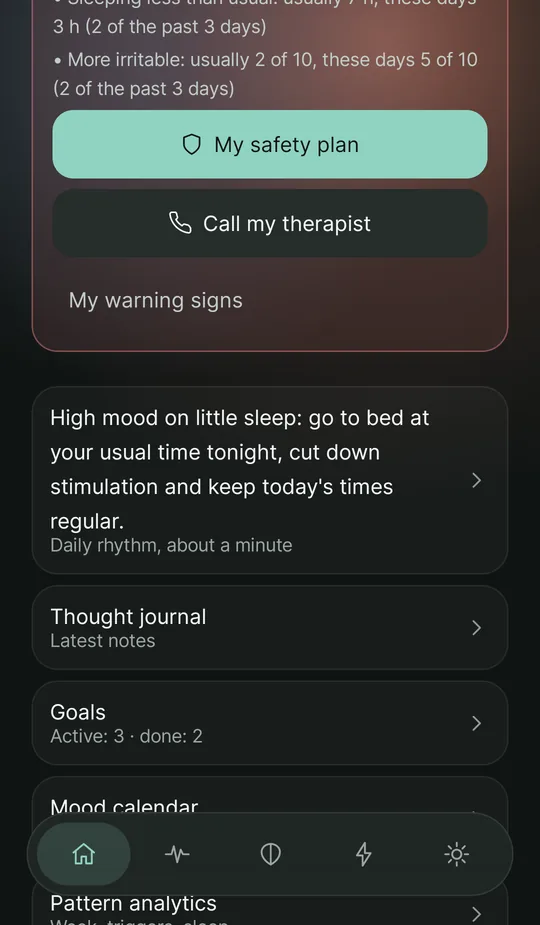
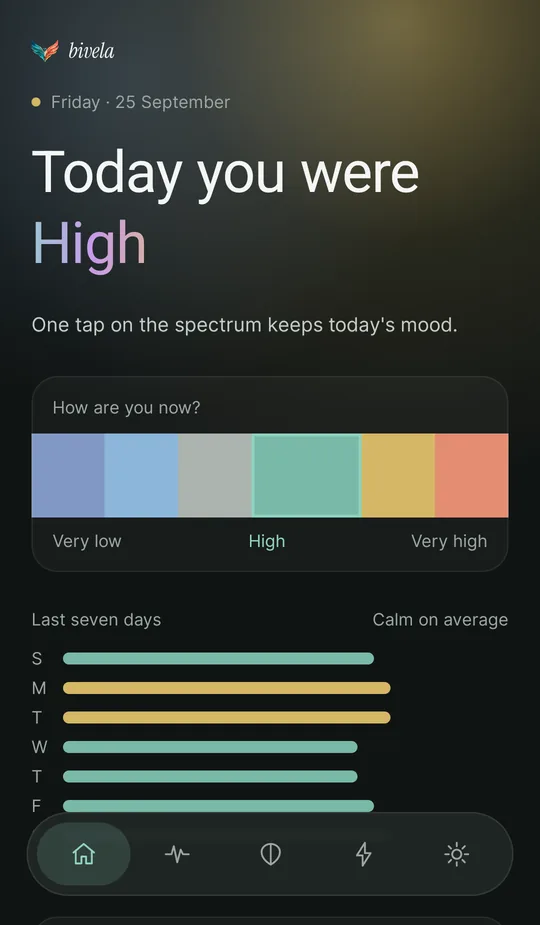
Each time you open the app one look is enough: how today went, and what would help now.
- “Today you were …”: today's mood in one word, from the mean of today's check-ins; and “How are you now?”: one tap on the spectrum logs this moment's mood, with no form to open.
- “Next step” reads the day the way bipolar care does: danger first (a very low mood → the safety plan); then a high mood on little sleep, the most common early sign of a high episode (tonight's sleep and the daily rhythm); strong anxiety (4-7-8 breathing); three low days in a row (session prep); a high mood (your own warning signs); then sleep, goals and energy. One tap opens that part of the app.
- The warning-signs card, when several of your signs come back together, with buttons for your safety plan and your therapist.
- Recent check-ins with their times, and shortcuts to the thought journal, goals, the mood calendar and patterns.
- A home-screen widget: masked by default (“Bivela — tap to open”); only if you choose, it shows your latest mood, your streak of days and five quick-log buttons.
Daily check-in
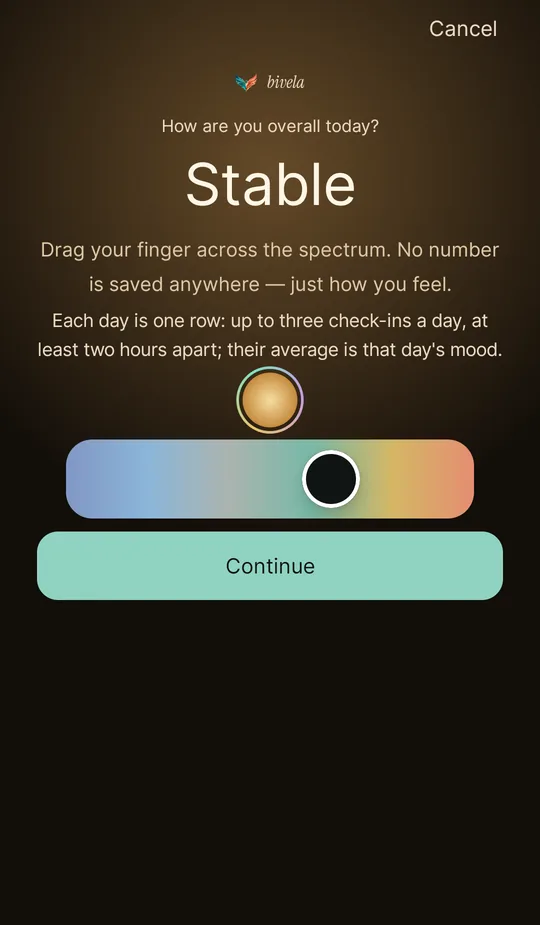
A few touches and your state is logged. The more regular it is, the clearer the pattern.
- A mood spectrum from −5 (depression) to +5 (elation or mania).
- Energy, anxiety and irritability, each from 0 to 10.
- Sleep hours and quality.
- The triggers and supports of that day, and a free note.
- A Jalali calendar to look back over the days; a day with several check-ins lists them all with their times.
- Each day is one row: up to three check-ins a day, at least two hours apart; a sooner one updates the last, and last night's sleep counts once for that day.
- “Last seven days” on the home screen: seven real calendar days with a real average, and a line for the highs and lows of days with several check-ins.
Patterns and insights
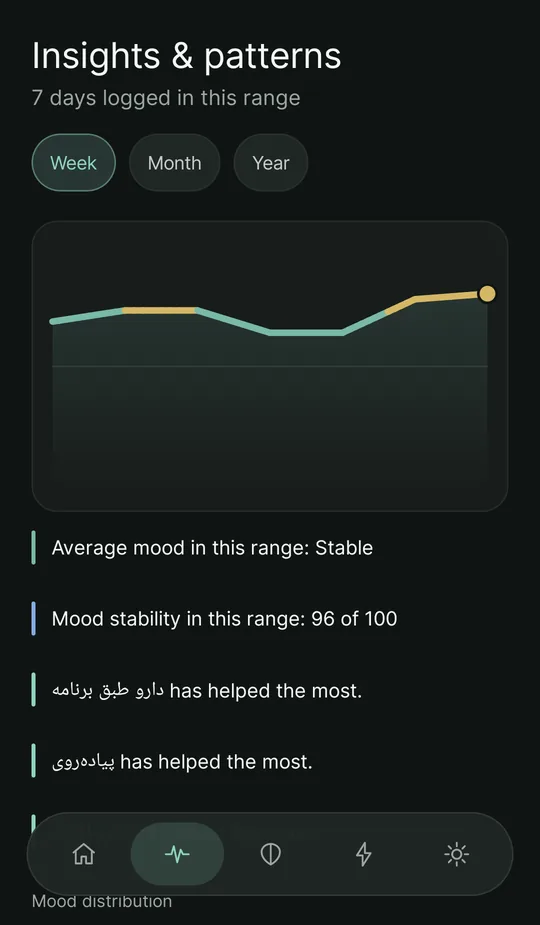
Your entries become something you can show and talk about.
- Trend charts for a week, a month and a year.
- The average and “mood stability” in the chosen range.
- How sleep and mood move together, and how anxiety and mood do.
- The triggers with the biggest effect on your anxiety, and the supports (such as a walk or taking your medicine on time) that helped most.
- How your mood was spread: how many days high, steady or low.
- From the same screen, “Prepare a summary for your therapist” and the visit summary.
- Pattern alerts, such as a sustained drop in sleep.
These are tracking tools, not a diagnosis.
My warning signs
Most people have their own signs before an episode. Bivela helps you see yours sooner.
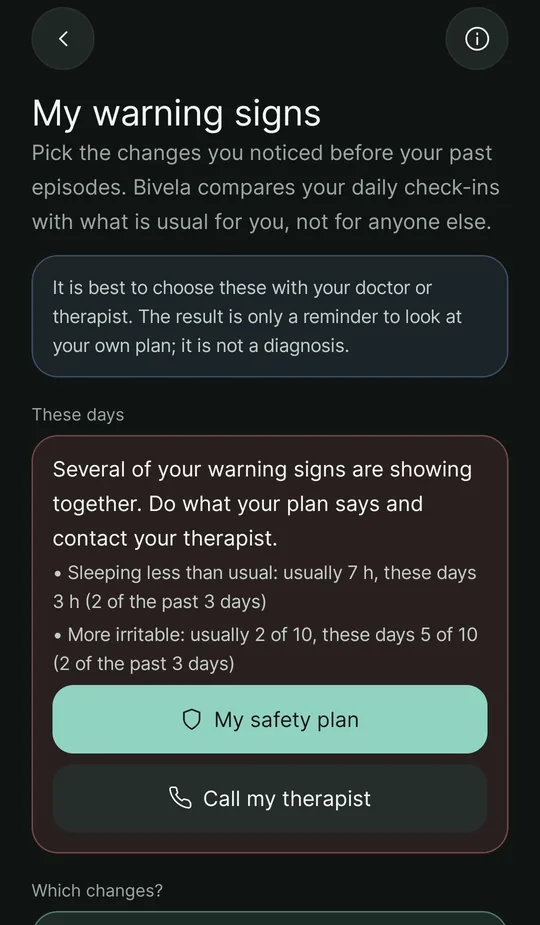
- Pick the changes you noticed before past episodes: sleeping less or more, more energy, mood higher or lower, more irritable or more anxious, or (if you note your daily rhythm) days that have come apart from their usual times. It is best to choose them with your doctor or therapist.
- Bivela compares your daily check-ins with what is usual for you, not for anyone else: “usually 7 h, these days 5.3 h”.
- When several signs come back together, a card on the home screen puts your safety plan and your therapist's number in front of you; if you want, a notification with generic text comes too.
- It tells no one by itself; whether to call is up to you. Only if you have turned on sharing with your doctor, warning signs included, does your doctor see them in your summary.
- A trusted companion: choose someone and write your message in advance; when you need it, one tap opens SMS (or a messenger) with that text — you send it yourself.
This is only a reminder to look at your own plan, not a diagnosis.
Daily rhythm
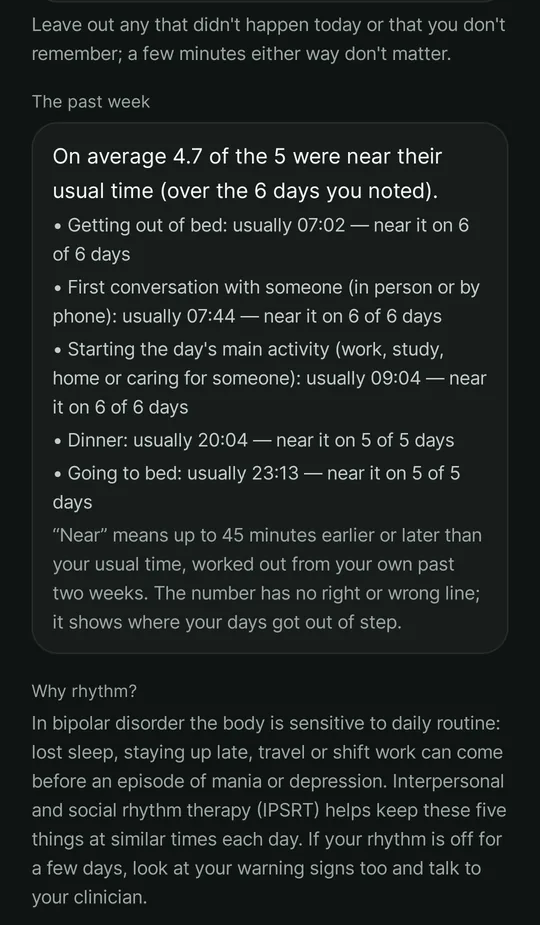
Regular days hold a steady mood; note the five fixed points of your day.
- When you got out of bed, your first conversation with someone, the day's main activity, dinner and going to bed — for today or yesterday, whichever you remember.
- Each week you see how close your days stayed to their usual times.
- If you choose, “a disrupted daily rhythm” becomes one of your warning signs: a day when at least two of these were more than 45 minutes off your usual time.
Sleep and sleep insightsNew
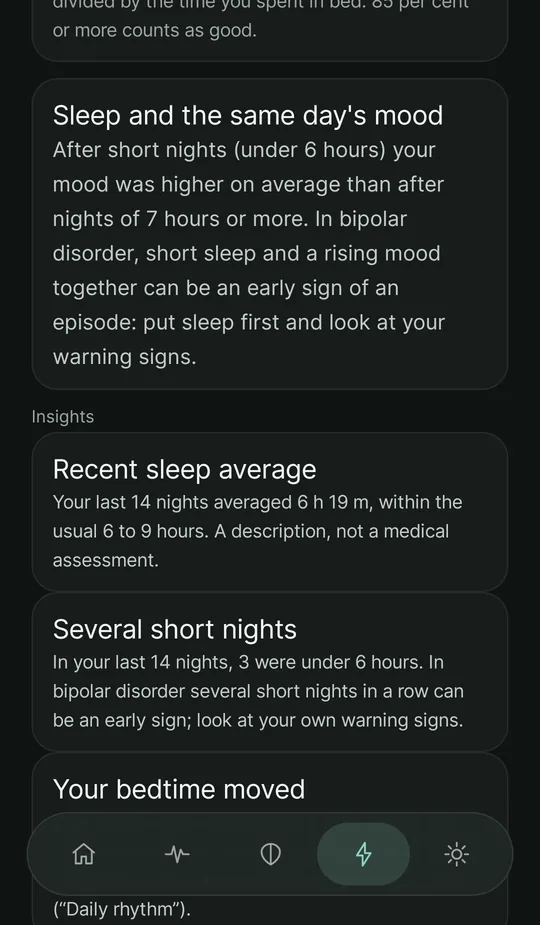
Sleep is one of the most important signals in bipolar disorder; Bivela takes it seriously.
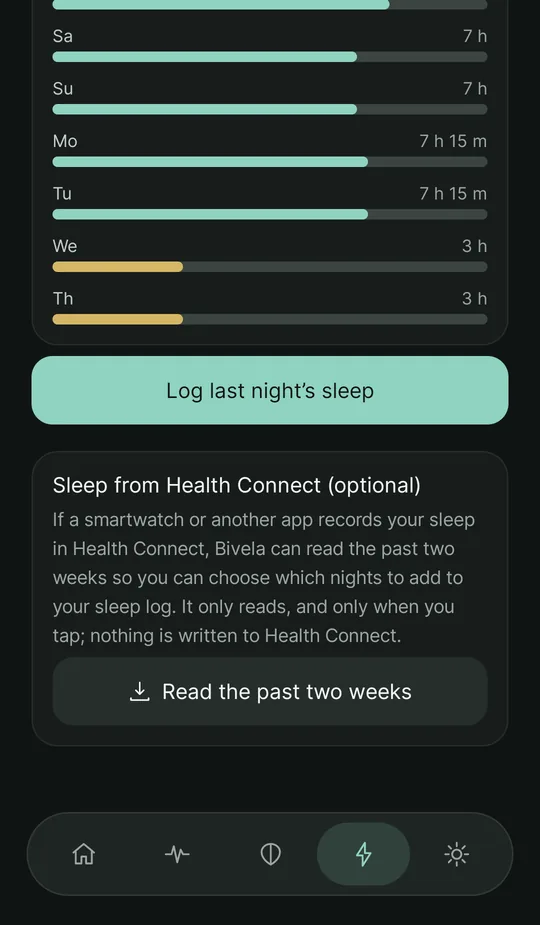
- Log each night: when you went to bed and woke up and how well you slept, with a chart of the last seven nights.
- A full sleep diary (optional): how long it took to fall asleep, how often and how long you were awake in the night, when you got out of bed, and daytime naps. From these Bivela works out your “sleep efficiency” (the time you actually slept divided by the time you spent in bed), with a seven-day average and how far apart your waking times were — the numbers the “Better sleep” program works with.
- Sleep insights from your own last 14 nights: your average sleep, how many nights were under 6 hours, and how far your bedtime moved.
- Sleep and the same day's mood: your mood after short nights is compared with the days after nights of 7 hours or more (at least two days on each side). If short sleep went with a rising mood, it says so plainly — in bipolar disorder that pattern can be an early sign of an episode.
- One night, one answer: the day's first check-in takes last night from your sleep log, and logging tonight's sleep gives the same answer to that day's check-ins.
Goals, routines and habits
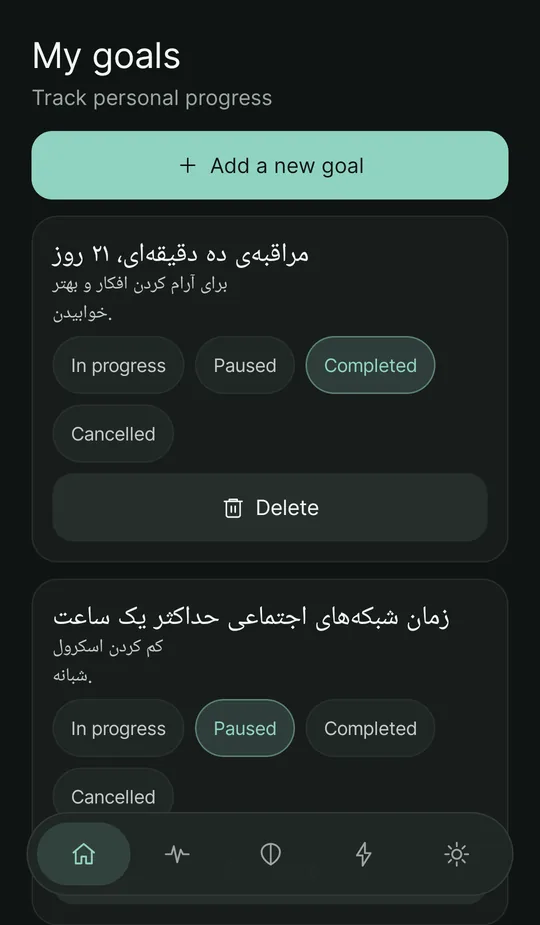
Small, regular steps are the ground of stability.
- Personal goals with a description, and the status of each: in progress, paused, completed or cancelled.
- Morning, evening and bedtime routines, each with its streak of days.
- Habit tracking with streaks.
Sleep from Health Connect
If a smartwatch or another app records your sleep, you do not have to enter it twice.
- Entirely optional: only when you tap the button and allow reading your sleep.
- The past two weeks of sleep are read, and you choose which nights to add to your sleep log.
- Read only: Bivela writes nothing to Health Connect, and the nights you choose stay encrypted like the rest of your data.
- A lone short nap during the day is left out, so it does not skew your night-sleep average.
Health Connect is not on every phone; without it, the rest of the app works the same.
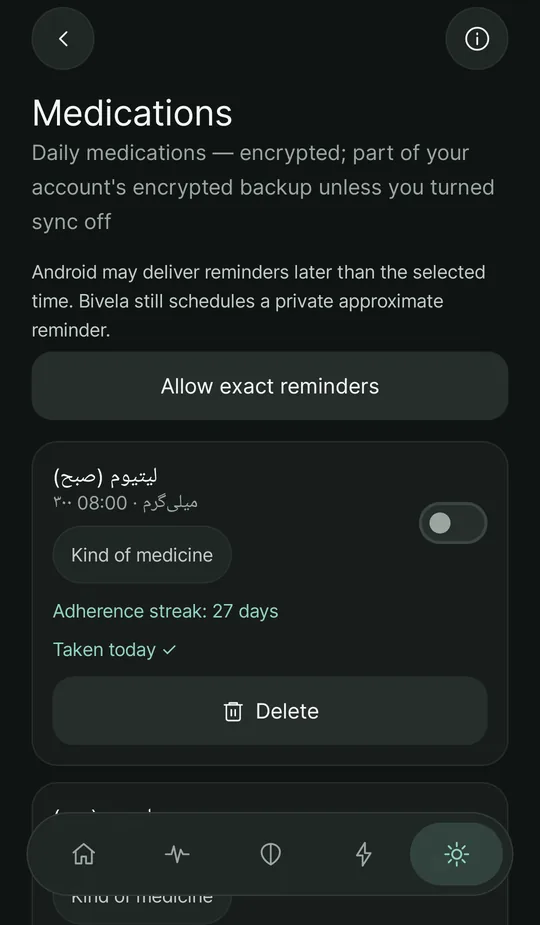
Medication & reminders
Reminders for your medication, and a record of whether you took it.
- A medication list with name, dose and time.
- Exact alarms wherever Android allows them; otherwise approximate reminders — and the app tells you which one you have.
- Dose tracking and streaks.
- An optional “stimulant” or “antidepressant” label for each medicine. With it, a short note says these medicines can sometimes lift mood in bipolar disorder and suggests turning on the “My warning signs” reminder; it turns nothing on by itself and gives no advice about starting or stopping a medicine.
- Some phones, especially Xiaomi, Redmi and POCO, stop apps in the background to save battery, so reminders arrive late or not at all; the app shows how to adjust those phones.
- Notifications carry no health details: the text is always generic and hidden on the lock screen by default.
Tests and lithium
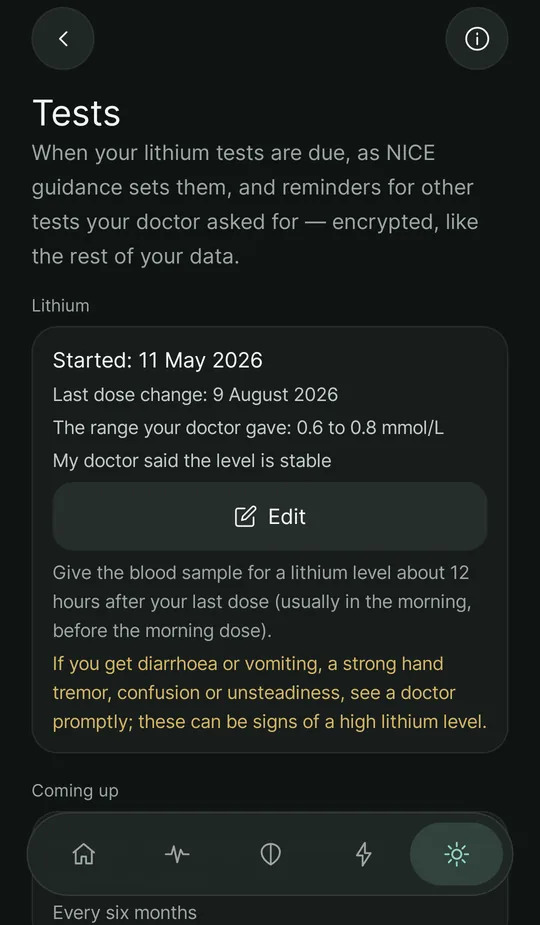
Regular tests are part of treatment with lithium; Bivela keeps the dates for you.
- Test dates under NICE guidance: the lithium level one week after starting or a dose change, weekly until your doctor says the level is stable, every three months in the first year and every six months after that; kidneys and electrolytes, thyroid and weight every six months.
- Results next to the range your doctor gave; Bivela does not judge a lithium level itself.
- When to give the blood sample (about 12 hours after the last dose), and the signs of a high lithium level that mean seeing a doctor promptly.
- Tests for other medicines (such as a valproate level, or blood sugar and lipids for antipsychotics) at the interval your doctor gave.
- A reminder only on days a test is due or overdue, with text that says nothing about the test.
Cognitive-behavioural work (CBT)
Exercises that sit alongside therapy, not in place of it.
- A thought record in six steps: situation, automatic thought, emotion, cognitive distortion, balanced thought and outcome.
- A library of cognitive distortions.
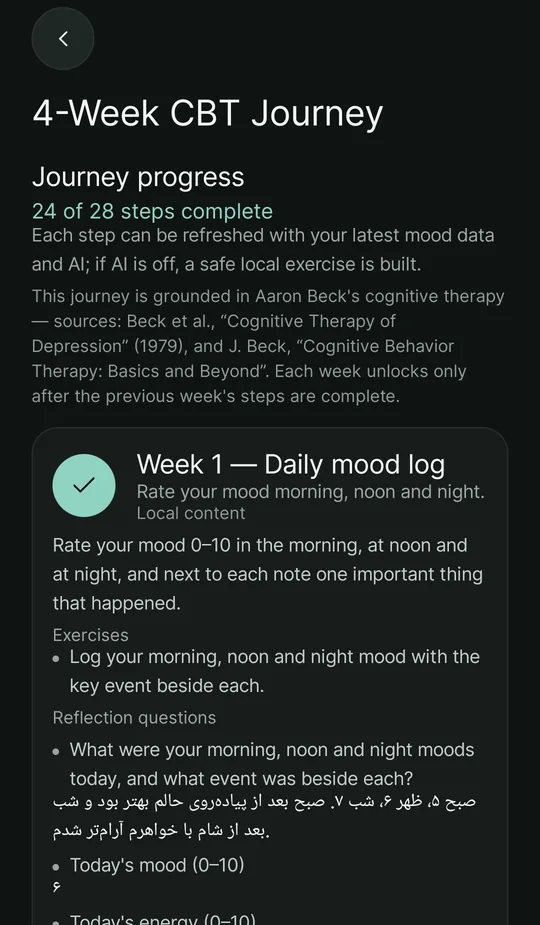
- A step-by-step four-week journey.
- Content packs and a bipolar toolkit.
- A short adaptive plan, with the help of AI (optional).
Companion programs
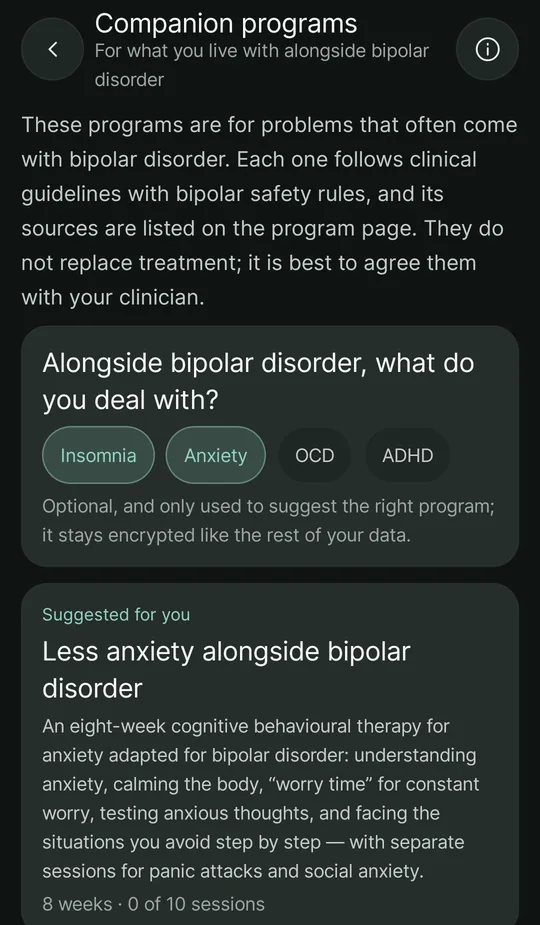
For what often comes alongside bipolar disorder; step by step, following clinical guidelines, with bipolar safety rules.
- Four programs: “Better sleep” (cognitive behavioural therapy for insomnia, six weeks), “Less anxiety” (eight weeks, with sessions for constant worry, panic attacks and social anxiety), “OCD: exposure and response prevention” (ten weeks) and “Adult ADHD: organisation and focus” (six weeks).
- Adapted for bipolar disorder: sleep is never cut sharply (the sleep window is at least 6 hours 30 minutes), the heavier parts and hard exposures stay paused while your own warning signs are showing, and there are warnings about antidepressants and stimulants, which can set off mania in bipolar disorder.
- Each session: reading, an exercise, written answers and links to the app’s tools such as sleep and the thought record; sessions open in order, with gaps between them.
- Choosing what comes alongside bipolar disorder (insomnia, anxiety, OCD, ADHD) — when you start, in your profile or right here — puts the right program first. Each program lists its sources on its page.
The programs do not replace treatment; it is best to agree them with your clinician. Your answers stay encrypted like the rest of your data.
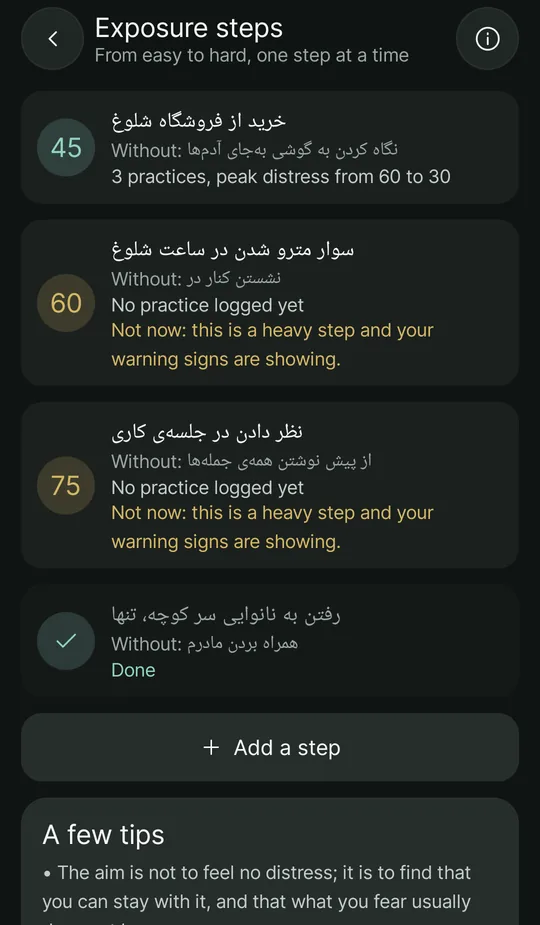
Exposure steps
The tool of the anxiety and OCD programs: facing what you avoid, step by step.
- A ladder of situations, each with a distress rating from 0 to 100 and the safety behaviour or ritual to leave out.
- A log of each practice: distress before starting, at the peak and at the end, how many minutes, and whether you stayed without safety behaviours.
- A chart of the peak distress across practices; when it is down to half of the first time, the app suggests moving to the next step.
- While your own warning signs are showing, steps of 60 and above are set aside.
Journal
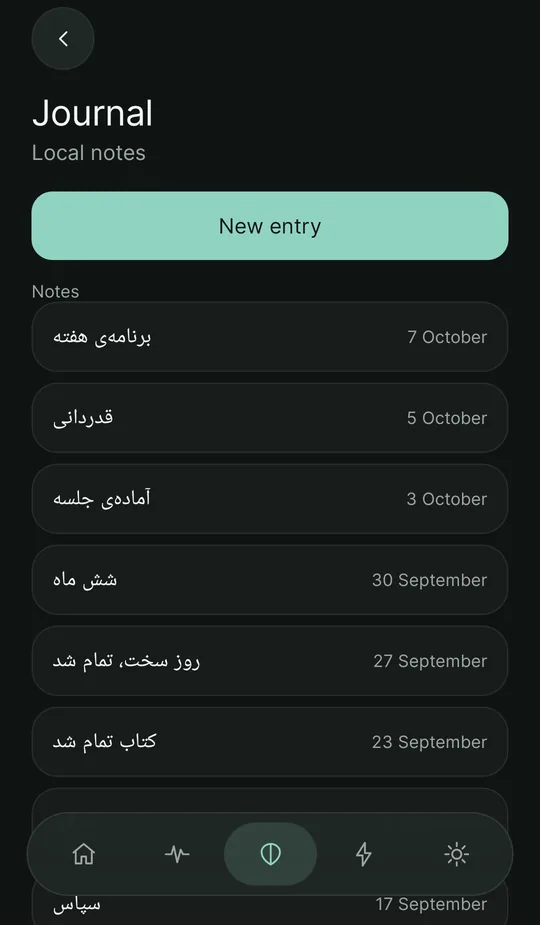
A place to write, only for yourself.
- Private notes with a title and a date.
- Encrypted on the phone and in the encrypted backup — not readable by our server.
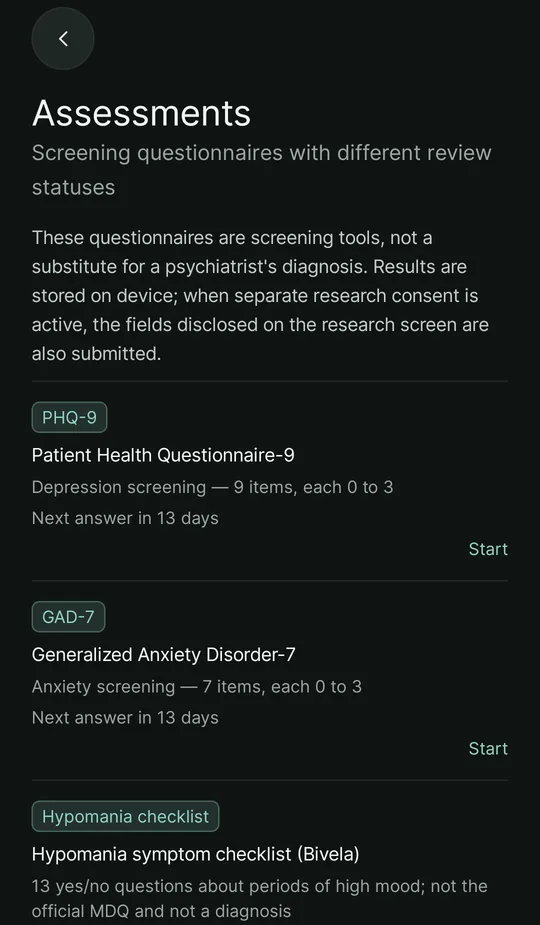
Screening questionnaires
Six well-known instruments and two checklists of Bivela's own — all eight active, whenever you like.
- PHQ-9 (depression), GAD-7 (anxiety), BDI-II (Beck depression), BAI (Beck anxiety), RRS (rumination) and DERS (difficulties in emotion regulation).
- A hypomania symptom checklist and a mania symptom self-rating — made by Bivela, not the official MDQ and YMRS; their totals cannot be compared with those instruments.
- The optional questionnaire at the start is entirely your choice and is always available again from “Tools”.
- A raw score and a trend over time.
- Saved in the app and in the encrypted backup.
- If you have connected to your doctor, the questionnaires they send from the doctors' site arrive in the app too.
- A two-weekly reminder (optional): PHQ-9 and GAD-7 ask about the past two weeks; two weeks after your last answer a reminder comes once, and the list shows “Next answer in … days”.
- If you answer anything but “not at all” to the question about thoughts of harming yourself in PHQ-9 or BDI-II, a calm card comes first, saying you are not alone and that telling your doctor helps, with “Urgent help” and “My safety plan”. Its rule is fixed and on the phone itself, with no AI.
The translation, scoring and interpretation of these instruments in the app are not clinically validated yet; that is why no interpretation is shown and the numbers are only for following a trend. The official MDQ and YMRS are not in the app: the YMRS is administered by a clinician in an interview, and using either in software needs the rights holder's permission.
The full list of questionnaires, with the doctors' site instruments
Safety and crisis support
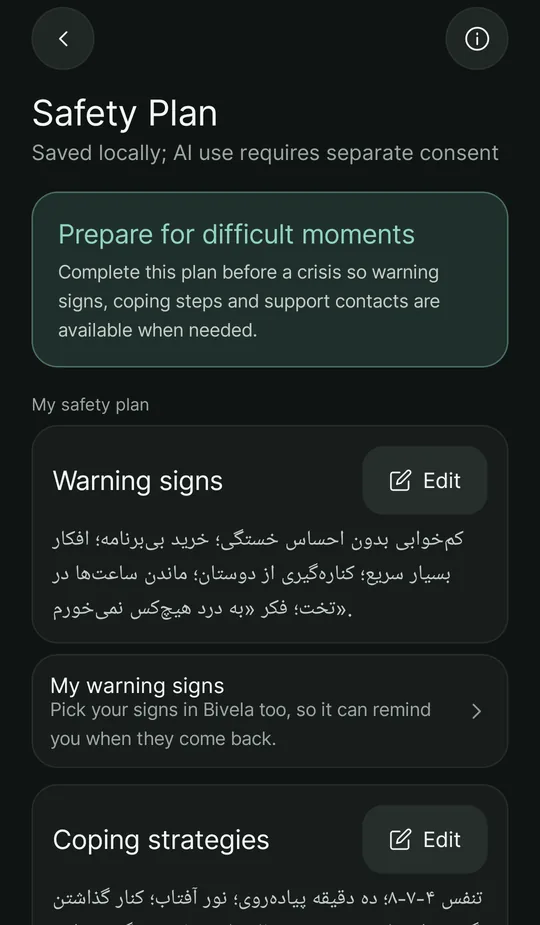
This part is deliberately plain: in a bad moment, design should not be in the way.
- A personal safety plan: warning signs, coping strategies, support contacts, professionals and reasons to stay.
- A crisis screen with the numbers 123 (Social Emergency) and 1480 (Welfare Counseling Line), shown even without internet.
- A 4-7-8 breathing exercise with a circle that breathes with you, and an “I'm safe now” button.
- “My safety plan” is at the top of the toolbox, so it is always one tap away — not only from the crisis screen.
Coverage and opening hours of the numbers depend on the region. If you are in immediate danger, call your local emergency number.
AI companion (optional)
Something that stays with you between sessions — if you want it.
- A conversation in Persian that, with your permission, knows your own data; each kind of data (such as your mood summary or sleep) asks for its own permission.
- A short reflection on your mood trend in “Patterns”, a weekly reflection, a non-diagnostic explanation of questionnaire results, the AI step of the CBT journey, the adaptive plan and examples of thinking traps.
- A memory you can see and erase.
- It does not diagnose, does not prescribe and is not a therapist; in a crisis, open the crisis screen.
It is off by default. Turning it on needs a separate consent, which you can withdraw at any time. One important thing about privacy: to answer, the text you send (and the categories you allow) has to reach the AI provider unencrypted — this is the only part without end-to-end encryption. Details are on the privacy page.
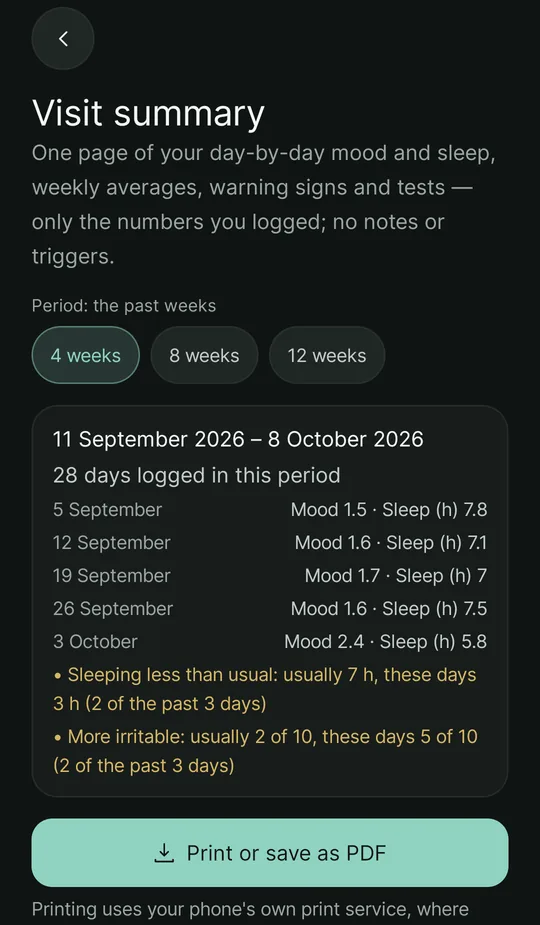
Visit summary
A few minutes with the doctor are not enough to tell them about every week; bring one page.
- Choose the period: the past 4, 8 or 12 weeks.
- Day-by-day mood and sleep in one chart, weekly averages of mood, energy, sleep, anxiety and irritability, notable days, warning signs and test results.
- Only the numbers you logged; notes and triggers are not on it.
- Print or save as PDF through the phone's own print service; the page is not sent anywhere.
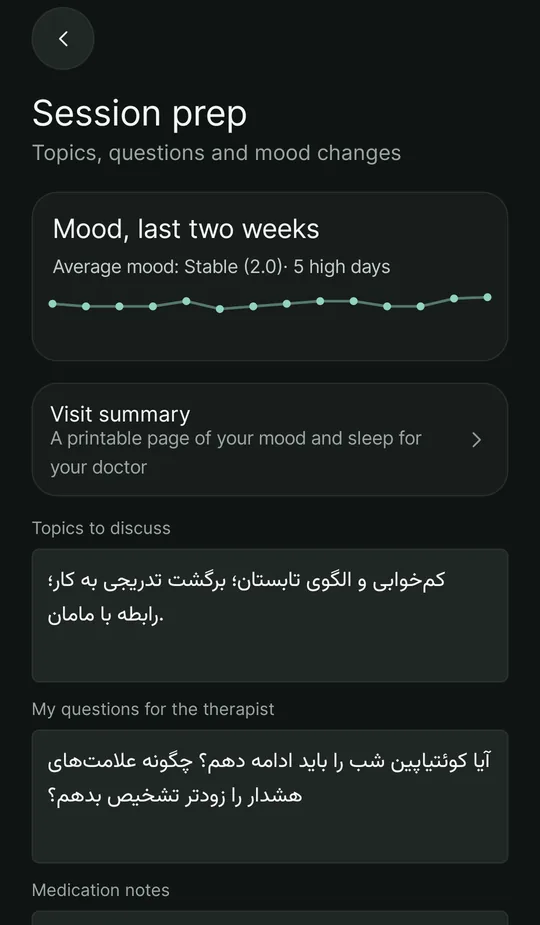
Therapy session, your doctor and research
Each is separate and only with your permission.
- Therapy-session prep: write topics, questions and a medication note beforehand.
- An encrypted export with a password you choose.
- Share with my therapist: if you have linked with your doctor, you can also send them the daily numbers of your mood and sleep between visits — your warning signs only if you choose that separately. Your doctor sees it when they open the doctors' site; it is not a way to reach them urgently. You can turn it off at any time.
- Research mode: anonymous scores, sent with explicit consent. The account ID does not travel with them.
- Pseudonymous research (separate and optional): your daily numbers under a random code made on the phone — no name, account or text — so each person's course over time can be followed. Turning it off deletes the code and all its days from the server.
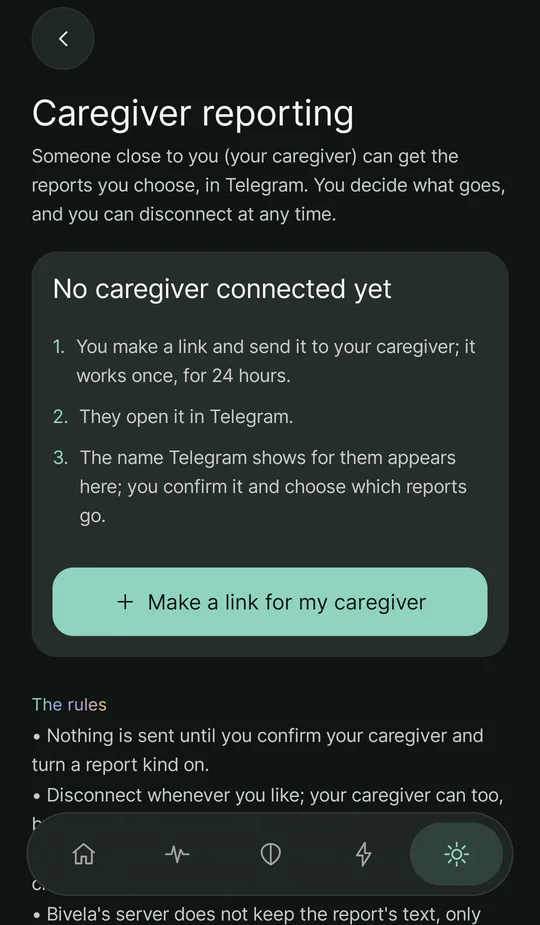
Reports to your caregiver in TelegramNew
Someone close to you gets the reports you choose — only them, only those, and only as long as you want.
- In “Settings → Caregiver reporting” you make a link and send it to your caregiver; it works once, for 24 hours. They open it in Telegram (Bivela's bot: @Bivelareport_bot).
- The name Telegram shows for them appears in the app by itself and you confirm it; if you do not know them, tap “Not them” and the link stops working. Nothing is sent before you confirm.
- Each kind of report is turned on by itself and is off by default: each check-in (mood, energy, sleep, anxiety, irritability, triggers, supports and note), questionnaire results, an alert when a check-in or questionnaire shows a risk sign, and the automatic daily and weekly summaries. Your name, age, diagnosis type, medicines and therapist from your profile go with each report, so your caregiver knows whose it is.
- “Preview” shows exactly the text your caregiver would get, with your own profile and sample numbers.
- Ending it: “Disconnect” in the app, or your caregiver sends /stop to the bot; deleting all your data ends it too. Either way the reports are turned off and the bot tells your caregiver the connection ended.
- Bivela's server does not keep the report's text, only when it was sent and whether it arrived. A message sent to Telegram stays in your caregiver's chat; Bivela cannot take it back.
Bivela's alert is not an emergency service and may come late or not at all. Caregiver reports need an account, so the server knows whose reports they are.
Reminders
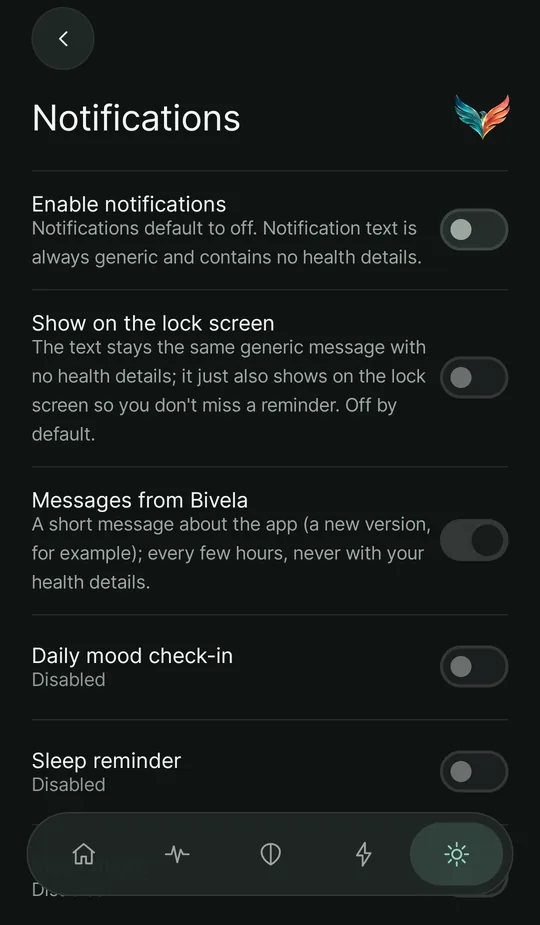
Off by default; you turn each on yourself, and none of them says anything about your health.
- Daily check-in, sleep reminder, medicines, therapy session, the weekly AI reflection, lab tests (only on the day one is due), your warning signs (only when they show) and the two-weekly questionnaire — each at its own time.
- “Messages from Bivela”: now and then a short message about the app itself (a new version, for example).
- Hidden on the lock screen by default; if you choose, the same generic text shows there too.
- Exact reminders wherever Android allows them, a guide for phones that close apps in the background (Xiaomi, Redmi, POCO), and a “Send a test notification” button.
Lock and everyday privacy
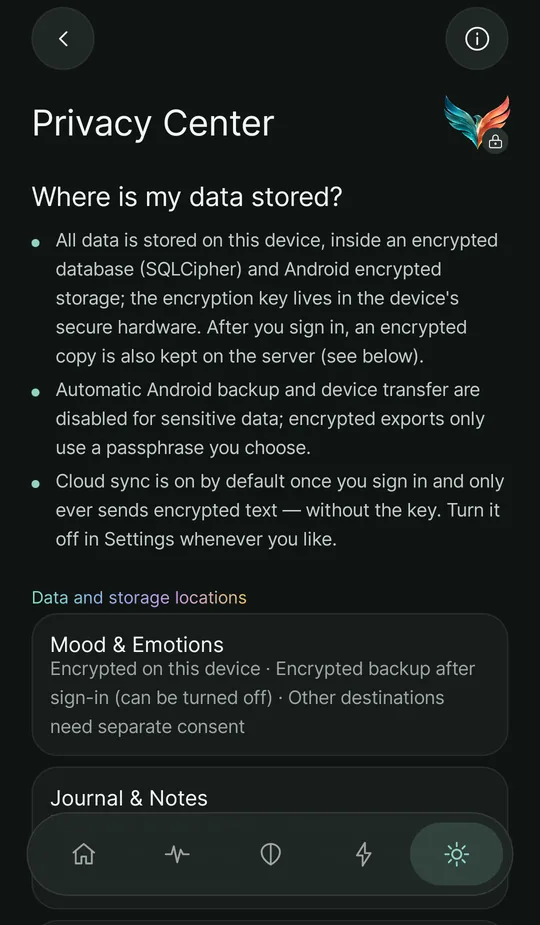
The privacy center gathers everything on one page.
- An app lock with a numeric PIN, fingerprint or the phone's own screen lock.
- Consent by category — 30 kinds of data and 7 destinations — that you can withdraw.
- In the final build, screenshots and the recent-apps preview are blocked.
- Usage counts and errors: every few hours only how often each part of the app was opened and the kinds of errors, with the app and phone version — no content; on by default and turned off on this page. The full crash log stays on the phone.
- “Share with Bivela's clinical team”: off by default; if you turn it on, the admins of Bivela's panel can see your synced data with the team's key, and every opening is recorded; turning it off closes access at once.
- A list of “Data and where it is kept”: where each kind of data stays and where it may go, including AI conversations, research data and caregiver reports.
- Erase everything, on the phone and on the server.
What's new, guides and updates
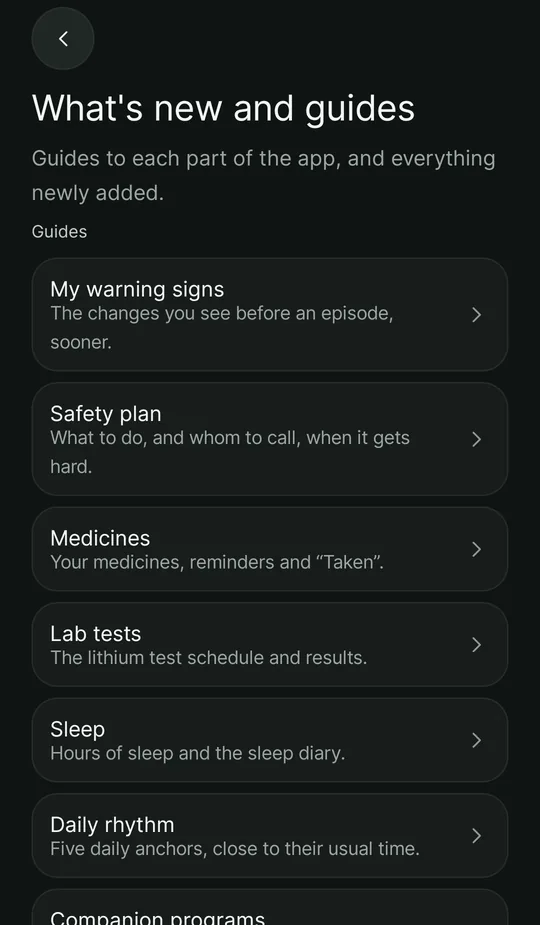
Each new feature is introduced with its guide, and a new version installs from inside the app.
- Updating from inside the app (Android): when a new version is out, tap “Update”; Bivela downloads the file from its own server, checks that it is the same app signed by Bivela, and opens Android's installer. Only when you are signed in. The first time, Android asks once to allow installing from this source.
- “What's new in this version”: after each update the new features are shown once, each with a button to that part of the app.
- “What's new and guides” in Settings, and a “Guide” button at the top of screens such as warning signs, the safety plan, medicines, lab tests, sleep, the daily rhythm and programs.
- “Reading”: short tips, exercises and articles that the Bivela team writes and reviews before publishing; clinical pieces only with an expert's approval.
- “Messages from Bivela”: now and then a short message about the app as a notification, and a card on the home screen with a button to that part of the app. A message never holds your health details, and it can be turned off under Reminders.
Updating from inside the app is on Android only; messages are not instant, since the app looks every few hours.
The Bivela phoenix and today's card
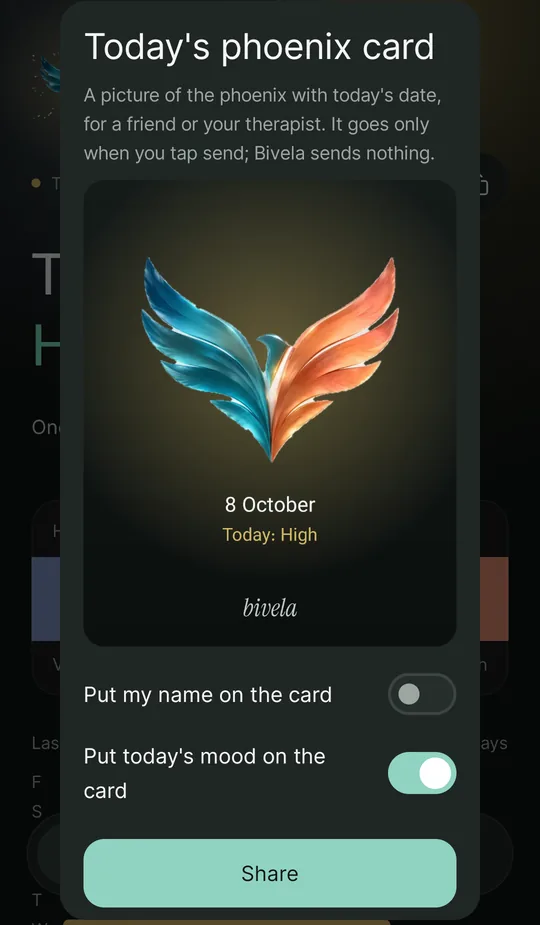
A little beauty beside the care, with nothing of yours leaving the phone.
- A living phoenix beside your name on the home screen, glowing in the colour of today's mood. The entry animation is silent, plays only now and then, and turns off under Settings → Appearance.
- Today's phoenix card: a picture of the phoenix with today's date for a friend or your therapist. Your name and today's mood go on it only if you switch them on, and Bivela sends nothing itself.
- Choose your Bivela logo from eight looks; the app's icon on the phone changes too.
Account and a new phone
Sign in with your email and password; everything comes back.
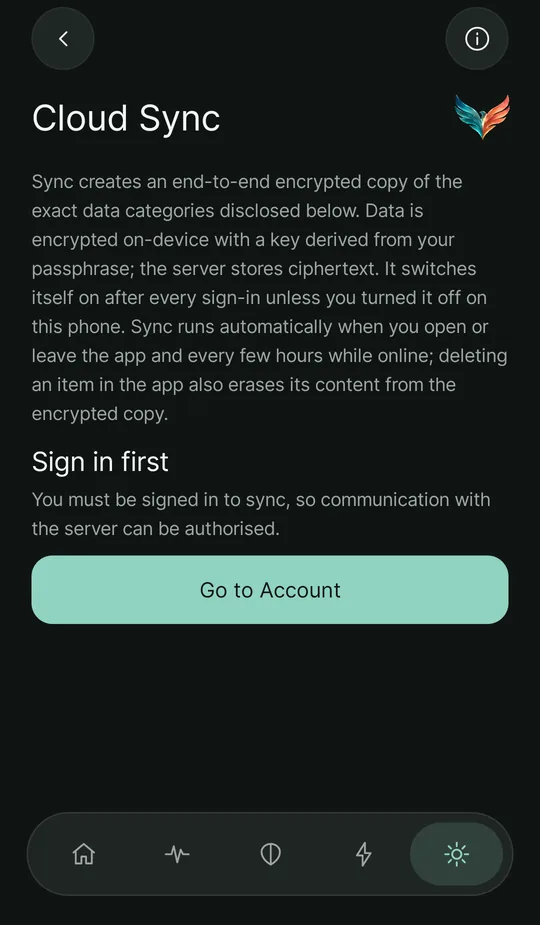
- After you sign in, an encrypted backup is kept on the server — on by default, and you can turn it off whenever you like.
- On a new phone you sign in with the same email and password and your data is restored automatically.
- A “recovery code”: 20 characters shown once; if you forget your password and set a new one, this code opens your encrypted backup again.
- “My subscription”: your plan, until when and from where; for now every part is open to everyone, and the safety plan, crisis numbers, medicines, check-ins and backup always stay free.
- Appearance: a dark, light or system theme, six accent colours, eight Bivela logo looks and the phoenix animation.
- Persian and English, right-to-left, Persian digits.
The real cost of end-to-end encryption: if you lose your password, we cannot open the backup either — only your own recovery code does.
What Bivela is not
- A diagnostic or treatment tool.
- A replacement for a clinician, medication or emergency services.
- A clinical study. No such study has been done yet.
- Published in a store. For now it is early access.
Screens are from the app, filled with sample data of a fictional user who writes in Persian.